What is Asterisk?
Asterisk™ is Open Source software with which you could turn a normal PC into a VoIP PBX. By the installation of special ISDN cards or analog adaptors you can also connect ISDN and analog phones beside SIP-capable phones.
Since the installation and configuration of an Asterisk PBX for professional use is quite complex, several manufacturers offer preconfigured systems that do not differ externally from a traditional PBX.
You find further information to Asterisk under:
- http://www.voip-info.org/wiki/view/Asterisk
- http://www.asterisk.org/
- Or you simply search via www.google.com for Asterisk and VoIP.
xtelsio TAPI for Asterisk
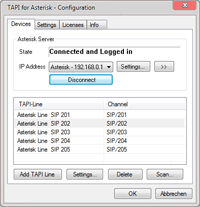
The xtelsio TAPI driver for Asterisk™ supports i.a. Dial and hang up and signal incoming and outgoing calls including numbers to your TAPI application. This works for any number of devices on one or more Asterisk systems. You can initiate calls directly from within Microsoft Outlook®, ACT® or any other TAPI application. For snom phones, you can activate a direct control mode - this allows to initiate calls in hands-free mode and to accept incoming calls.
Dialing a phone number:
If you dial a phone number from a TAPI application, your phone is called first and as soon as you pick up the destination number is dialed.Supported Functions
| ✔ ✔ ✔ |
Optionally Supported Functions
| ✔ ✔ ✔ ✔ |
Installation and Configuration
The TAPI driver can be installed on a Windows Server (also on a Terminal Server) or on every client computer.
Hint: xtelsio CTI Client already includes a TAPI-Connector for Asterisk. If you use the client, you don't need an extra TAPI driver for Asterisk.
The configuration of the TAPI driver is available via: [Control Panel > Phone and Modem Options > Advanced]; here the driver "xtelsio TAPI for Asterisk" should be to be seen after the installation.
Supported operating systems (32-bit and 64-bit): Windows 7/8/10/11, Vista, Windows Server 20xx.
Configuration examples:
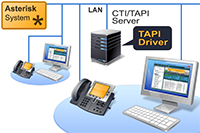
Central TAPI driverIn this configuration a TAPI Server is used to share a centrally installed TAPI driver in local network. The xtelsio TAPI Driver for Asterisk is installed on a Windows Server. The Windows Server also acts as a TAPI Server. To use the TAPI on client PC, the Remote TAPI Provider of the Server must be installed. You find additional infos at: Network TAPI |
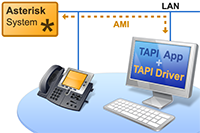
Decentralized TAPI driverThe xtelsio TAPI Driver for Asterisk can be installed on one ore more desktop PC. The driver is connected directly to the manager's interface of the Asterisk PBX via IP network. |
License Model
The license model is graded in ten-license packs.
A ten-license pack entitles to control and monitor 10 different Asterisk TAPI devices (TAPI lines).
With a ten-license pack you may install the TAPI driver also on more than 10 Computers, as long as is guaranteed that a total of maximum 10 different TAPI-Lines are used. If you install the TAPI driver for 11 PC workplaces and two of it share a phone, then a ten-license may be enough.
If you want to observe 19 phone lines with one PC, then you need 2 x ten-license. You can use these 20 licenses additionally on 20 other PCs, as long as is guaranteed that a total of maximum 20 different TAPI-Lines are used.